Showing posts with label widget. Show all posts
Showing posts with label widget. Show all posts
Tuesday, December 17, 2013
ULTIMATE CUSTOM WIDGET UCCW
Make your own widgets easily in a WYSIWYG (What-you-see-is-what-you-get) editor. Use custom layout, fonts, images, shapes, interesting objects like series clocks, weather information with icons, unread sms and gmail counts, battery information with bars and pie graphs, analog clocks, TASKER VARIABLES and more. Use hotspots to assign actions to widget.

Does not require programming, editing xml files or rooting your phone. Share your creations easily either through uzip files or make apks and post on Google play.
Or keep your unique widgets to yourself and tease others.
UCCW features in detail:
1) The following objects are available in widgets:
- time and date elements
- Week bar
- Analog clock
- Static texts
- Battery level, battery status, battery bar (solid and barcode) and battery circle
- Weather elements like current temperature, condition, humidity, wind speed, icon, minimum temperature, maximum temperature, forecasts etc.
- Shapes
- Images
- Unread counts for Gmail, sms and missed calls
- Next alarm time
- Series clocks and series time and date elements
- TASKER VARIABLES
2) Each objects has various options like size, color, alpha (transparency), rotation (angle) etc. to satisfy your most needs. Examples are using images for widget background, hour and minute objects;
using custom texts for time and date objects and weather conditions etc.
3) You dont need experience in coding, or knowledge of xml files. Root not required.
4) Use custom fonts easily. Put your fonts in sdcard/fonts and set them in the app.
5) Assign custom images, made in photoshop, gimp or paint, from gallery or file explorers.
6) Make your own analog clocks.
7) Make your own weather widgets. Adorn them with weather icons. UCCW supports different weather icons during night.
8) Import/ export, save skins for easy sharing. Post skins on Google play - see below.
9) Set hotspots on widgets. Hotspots are clickable areas on UCCW widget that perform action when touched. Actions are launching apps, opening alarm clock or update weather.
10) Use custom text option for time and date elements and weather condition. Useful for translation or having your own custom values to show in place of the default ones.
Skins:
Search Google play or visit website link for examples of skins.
To post your UCCW skins in Google play follow this link for further information:
http://forum.xda-developers.com/showthread.php?t=1901170
Notes:
Please dont ask questions in google play feedback. There is no way to answer you back. Either email me or post question on website link. Email link is given in app.
Issues:
1) Widget may not update if killed by task killers. Kindly exclude UCCW in task killers.
2) If you get force closes uninstall app and install again. Send me logcat if possible.
3) Clock not updating is an issue with the stock MIUI v4 launcher. Use different launcher if clock does not update.
4) Google play skins may not appear for some custom roms or if you changed screen density.


Does not require programming, editing xml files or rooting your phone. Share your creations easily either through uzip files or make apks and post on Google play.
Or keep your unique widgets to yourself and tease others.
UCCW features in detail:
1) The following objects are available in widgets:
- time and date elements
- Week bar
- Analog clock
- Static texts
- Battery level, battery status, battery bar (solid and barcode) and battery circle
- Weather elements like current temperature, condition, humidity, wind speed, icon, minimum temperature, maximum temperature, forecasts etc.
- Shapes
- Images
- Unread counts for Gmail, sms and missed calls
- Next alarm time
- Series clocks and series time and date elements
- TASKER VARIABLES
2) Each objects has various options like size, color, alpha (transparency), rotation (angle) etc. to satisfy your most needs. Examples are using images for widget background, hour and minute objects;
using custom texts for time and date objects and weather conditions etc.
3) You dont need experience in coding, or knowledge of xml files. Root not required.
4) Use custom fonts easily. Put your fonts in sdcard/fonts and set them in the app.
5) Assign custom images, made in photoshop, gimp or paint, from gallery or file explorers.
6) Make your own analog clocks.
7) Make your own weather widgets. Adorn them with weather icons. UCCW supports different weather icons during night.
8) Import/ export, save skins for easy sharing. Post skins on Google play - see below.
9) Set hotspots on widgets. Hotspots are clickable areas on UCCW widget that perform action when touched. Actions are launching apps, opening alarm clock or update weather.
10) Use custom text option for time and date elements and weather condition. Useful for translation or having your own custom values to show in place of the default ones.
Skins:
Search Google play or visit website link for examples of skins.
To post your UCCW skins in Google play follow this link for further information:
http://forum.xda-developers.com/showthread.php?t=1901170
Notes:
Please dont ask questions in google play feedback. There is no way to answer you back. Either email me or post question on website link. Email link is given in app.
Issues:
1) Widget may not update if killed by task killers. Kindly exclude UCCW in task killers.
2) If you get force closes uninstall app and install again. Send me logcat if possible.
3) Clock not updating is an issue with the stock MIUI v4 launcher. Use different launcher if clock does not update.
4) Google play skins may not appear for some custom roms or if you changed screen density.
SCREENSHOTS:


Battery Monitor Widget Pro v2 7 5 APK
 Battery Monitor Widget Pro v2.7.5 APK - Now You Can Download Battery Monitor Widget Pro v2.7.5 APK in Apk Archive - the best Apk Site Downloader, thats android apps file has been archived and you can also download it for free through the link at the end of this post, if you dont know how to Download just Go to The Download Instruction to find the way to get the android apps apk file you want to download, and dont forget to leave a comment if you find something wrong so we can review our archive and give it the best for you all.
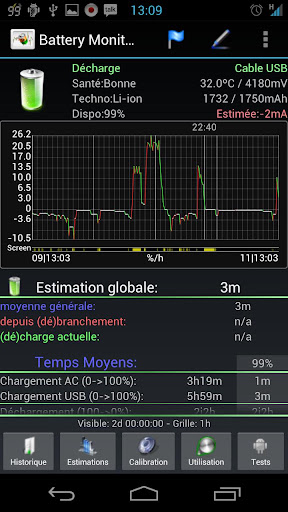
Complete battery monitoring with notification icon, history, graphics and alarms
Tested on Galaxy Nexus, Galaxy Note, HTC One X, Iconia A500, Transformer all under ICS: Consumes < 3 seconds of CPU per day using default (recommended) settings.
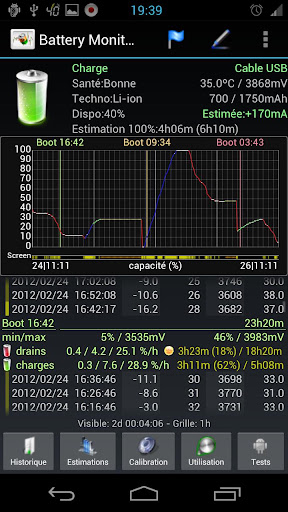
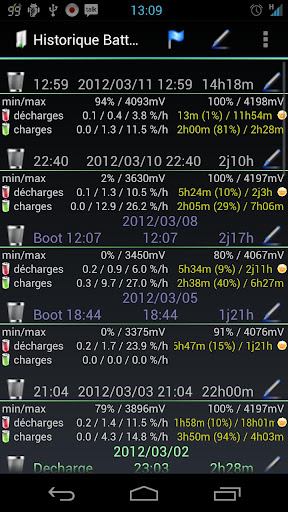
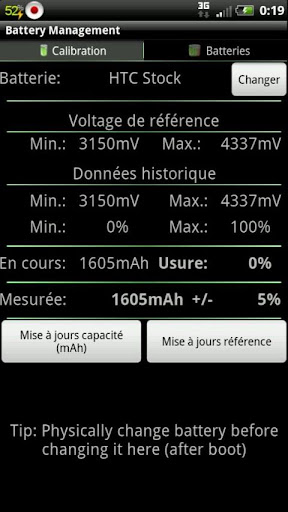
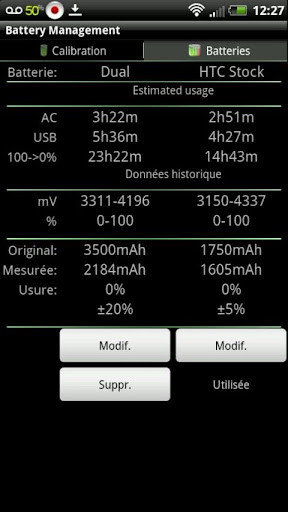
The most complete tool to manage your battery: Shows historical data (%, mA, mW, mV and temperature), calculates estimated run-times and battery aging, helps calibrate battery and improve your battery run-time.
NB:
- NOT all phones report accurate mA - Check app web-site for more information
- The app displays the % remaining, voltage and temperature data reported by Android OS
- HTC One X reports incorrect mA during standby, use mA corrections for better results
- Android battery stats have nothing to do with % calculations
Display all information using great looking graphics, fully scrollable and zoomable.
Use additional packages to show great looking icons in notification bar
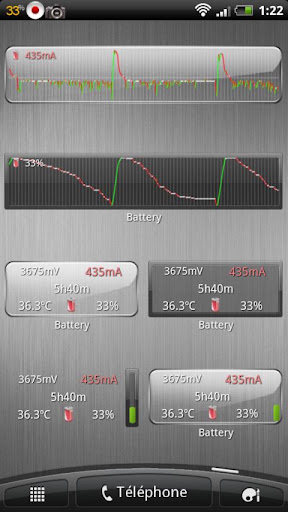
Display historical graphics or battery data on your home screen using widgets of various sizes!
Triggers alarm based on battery data (voltage and temperature limits)
Manually resets battery calibration/statistics on rooted phone
Support Motorola Defy/Atrix 1% reporting
Online help accessible from settings
Export data to System Tuner Pro to analyze which process is responsible for battery drain!
Lowest battery consumption on the market! Disable history/graphics for even lower consumption! Check web-site for app consumption and supported phones.
Whats in this version : (Updated : Apr 28, 2013)
- Add support for XT926, HTC First, HTC J One and HTC One running CM10.1
- Updated traditional Chinese translation
Required Android O/S : 1.6+
Screenshots :

Saturday, December 14, 2013
Free Simple Calendar Widget 2 4 7 Apk on Blogger
Simple Calendar Widget 2.4.7 Apk

Download & Details of Simple Calendar Widget 2.4.7 for Android Apk:
Application Name: Simple Calendar Widget 2.4.7
File Type: .apk
File URL: https://play.google.com/store/apps/details?id=com.anod.calendar
Si e: 1.6M
Category: Productivity
Last Updated: September 19,...
Simple Calendar Widget 2.4.7 Apk
Subscribe to:
Posts (Atom)